
Preventive Maintenance Analytics Dashboard | Garage Operations and Material Readiness
Project Overview
This Power BI project provides an end-to-end view of preventive maintenance operations for a vehicle fleet. The dashboard connects vehicle scheduling, maintenance order execution, manpower-hour performance and material availability in one interactive reporting solution.
The report is organized into three pages:
Maintenance Overview
PM Execution & Order Performance
PM Material Readiness
Together, these pages help maintenance teams monitor vehicle progress, identify operational delays, evaluate workshop performance and detect material shortages that could affect maintenance completion.
Key Features
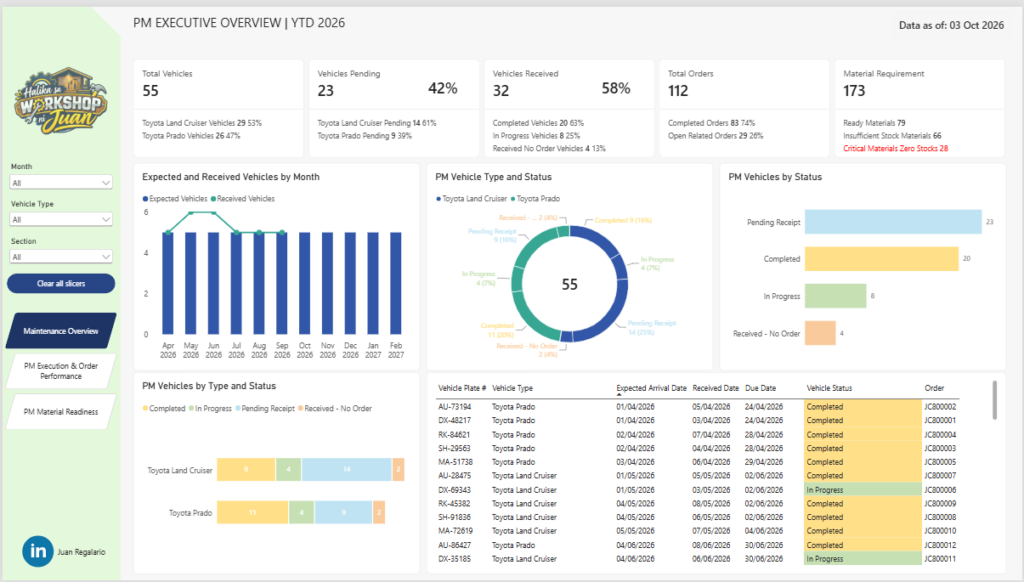
Executive overview of vehicles scheduled, received, completed, in progress and pending receipt
Comparison of expected and received vehicles by month
Vehicle status analysis by vehicle type
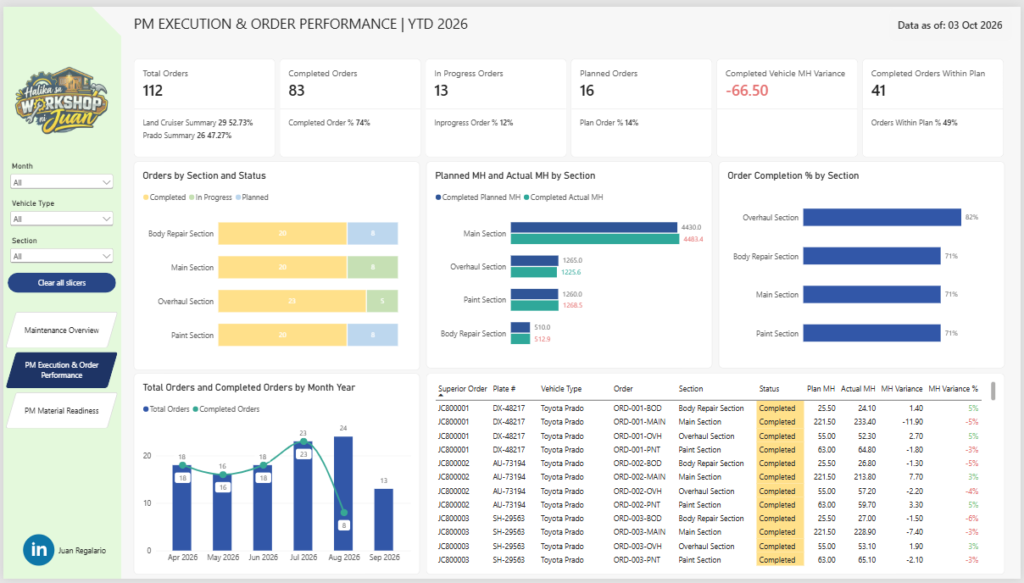
Maintenance order tracking by workshop section
Planned versus actual manpower-hour comparison
Order completion percentage by section
Monthly order execution trend
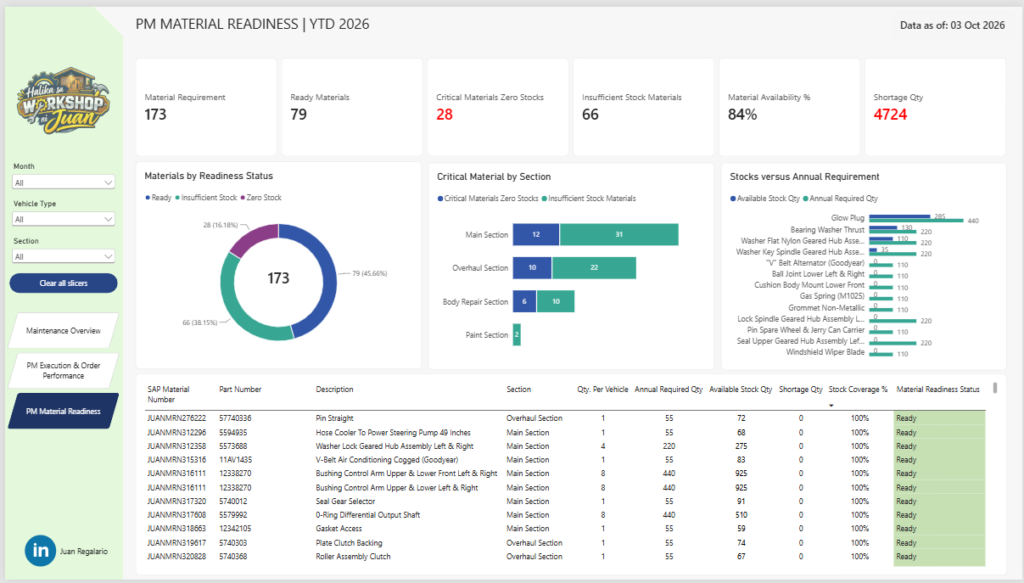
Material readiness and stock-availability monitoring
Identification of zero-stock and insufficient-stock materials
Stock quantity versus annual material requirement comparison
Detailed operational tables for vehicle, order, and material-level analysis
Interactive filtering by month, vehicle type, and workshop section
Page navigation and clear-slicer functionality
Interactive Dashboard
View the Interactive Power BI Dashboard
The dashboard allows users to filter the analysis by reporting month, vehicle type, and maintenance section. Selections automatically update the KPI cards, charts and detailed tables across each report page.
Insights and Analysis
Maintenance Overview
A total of 55 vehicles were included in the preventive maintenance program.
32 vehicles, or 58%, were received, while 23 vehicles, or 42%, remained pending receipt.
Of the received vehicles, 20 were completed, 8 were in progress and 4 were received without an associated maintenance order.
Toyota Land Cruiser and Toyota Prado maintenance activity can be compared separately to identify differences in receipt and completion status.
Monthly expected-versus-received analysis helps highlight scheduling gaps and delayed vehicle arrivals.
PM Execution and Order Performance
The maintenance program generated 112 work orders.
83 orders were completed, representing a completion rate of approximately 74%.
A further 13 orders were in progress, while 16 remained planned.
The Overhaul Section achieved the highest displayed order-completion rate at 82%, compared with approximately 71% for the other workshop sections.
Planned and actual manpower hours are compared by section to highlight underutilization, overruns, and execution variance.
The detailed order table enables users to investigate individual vehicles, work orders, maintenance sections, statuses and manpower-hour variances.
Material Readiness
The maintenance plan required 173 material items.
79 materials were ready, while 66 had insufficient stock and 28 had zero stock.
Overall material availability reached 84%, but the total recorded shortage quantity was 4,724 units.
The Main Section contained the largest number of material-readiness issues, making it an important area for procurement and inventory follow-up.
Comparing available stock with annual requirements helps identify materials that could become constraints before maintenance work begins.
Critical materials and shortage quantities are highlighted to support prioritization and corrective action.
Technical Skills Applied
Power BI Desktop for report development and visual design
Power Query for data extraction, cleaning, transformation and validation
DAX for calculated measures, KPIs, percentages, status counts and performance variances
Data modeling to connect vehicle, maintenance-order, manpower-hour, material and date information
Conditional formatting to highlight critical shortages, negative variances and operational exceptions
Interactive slicers for month, vehicle type and maintenance section
Drill-down analysis from executive KPIs to individual vehicles, orders and materials
Dashboard navigation using buttons and page navigation
Data storytelling through consistent colors, KPI summaries, comparison charts and detailed tables
Impact
This dashboard transforms maintenance and inventory records into a structured decision-support tool. It provides management with a consolidated view of whether vehicles are arriving as scheduled, whether maintenance orders are being completed according to plan and whether the required materials are available.
By combining operational execution with material readiness, the dashboard helps users identify potential maintenance delays earlier, prioritize critical stock requirements, monitor workshop performance and improve coordination between maintenance, planning and supply teams.
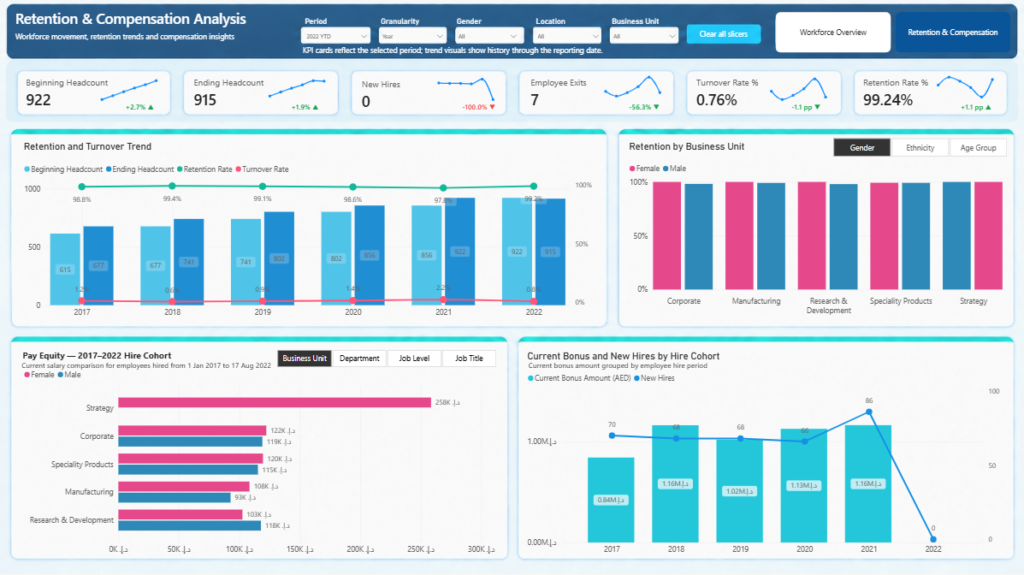
HR Analytics Dashboard | Workforce Retention and Compensation
Project Overview
As part of my data analytics portfolio, I developed an interactive HR Analytics Dashboard in Power BI using the dataset from the previous FP20 Analytics Challenge 15.
The project transforms employee records into a structured two-page report covering workforce demographics, gender representation, compensation, leadership, retention, turnover and employee movement.
The first page provides an overview of the current workforce, while the second page focuses on retention, turnover, compensation and hiring trends. The dashboard was designed to help HR teams and business leaders identify workforce patterns, compare employee groups and support data-driven workforce planning.
Key Features
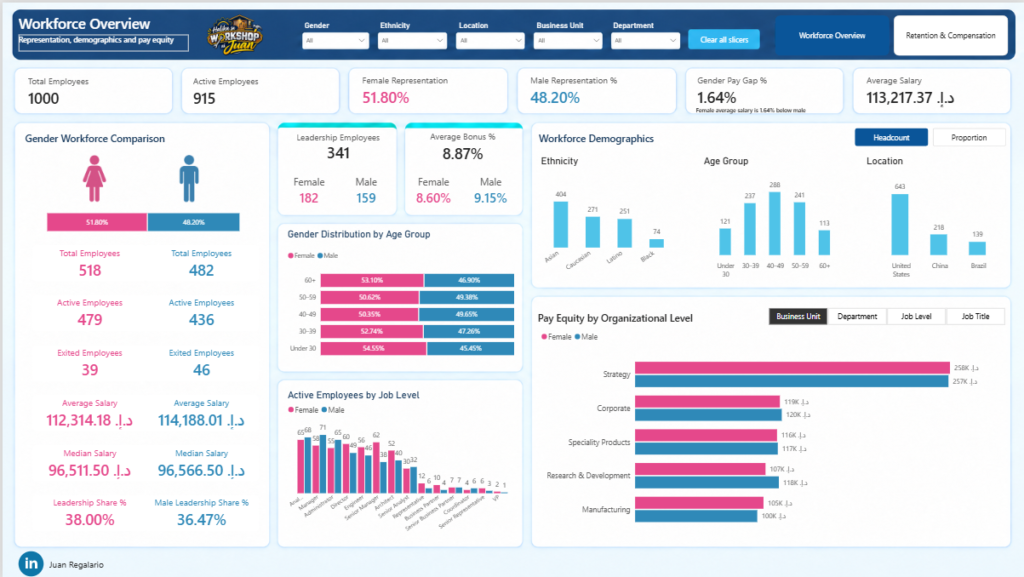
Workforce KPI Cards: Total employees, active employees, gender representation, average salary and gender pay gap.
Gender Workforce Comparison: Side-by-side analysis of employee count, active employees, exits, average salary, median salary and leadership representation.
Interactive Workforce Demographics: Headcount and proportion views across ethnicity, age group and location.
Pay Equity Analysis: Female and male salary comparison across Business Unit, Department, Job Level and Job Title.
Retention and Turnover Analysis: Period-aware calculations using beginning headcount, ending headcount, employee exits and average headcount.
Retention Breakdown: Retention-rate comparison by Business Unit, Gender, Ethnicity and Age Group.
Compensation and Hiring Analysis: Current employee bonus amounts grouped by hire cohort, together with new-hire trends.
Dynamic Report Controls: Field parameters, slicers, bookmarks, tooltips, reset buttons and page-navigation controls.
Interactive Dashboard
Explore the live Power BI report:
View the Interactive HR Analytics Dashboard
Users can interact with the report by filtering Gender, Ethnicity, Location, Business Unit and Department. The report also provides dynamic selections for time granularity, organizational level, demographic view and retention breakdown.
Insights and Analysis
The dataset contains 1,000 employee records, of which 915 are active.
Female employees account for 51.80% of the workforce, while male employees represent 48.20%.
Female and male representation is relatively balanced across the organization.
The overall average annual salary is approximately AED 113.2K.
Female employees have an average salary of approximately AED 112.3K, compared with AED 114.2K for male employees.
The overall gender pay gap is 1.64%, indicating that the female average salary is slightly below the male average.
Median salaries are nearly equal at approximately AED 96.5K, suggesting that the overall pay gap may be influenced by differences in employee distribution across senior or highly paid positions.
For 2022 YTD, headcount decreased from 922 to 915, with no new hires and seven employee exits.
The corresponding 2022 YTD turnover rate is 0.76%, while the retention rate is 99.24%.
The United States has the largest employee population, followed by China and Brazil.
Asian employees represent the largest ethnicity group in the dataset, followed by Caucasian and Latino employees.
The dashboard also highlights differences in salary, retention and workforce representation across organizational levels and demographic groups.
Technical Skills Applied
Power Query: Data cleaning, validation, data-type correction and creation of supporting employee attributes.
Data Modelling: Fact and date-table design, active and inactive date relationships and organized measure tables.
DAX: Headcount, active employees, employee exits, gender representation, salary measures, median salary, bonus calculations, pay-gap analysis, retention rate and turnover rate.
Time Intelligence: Year, quarter and month analysis using a dedicated Date dimension and dynamic granularity controls.
Field Parameters: Dynamic switching between Business Unit, Department, Job Level, Job Title and demographic breakdowns.
Bookmarks and Navigation: Headcount and proportion views, report-page navigation and reset-filter functionality.
Data Visualization: KPI cards, clustered charts, stacked demographic comparisons, combination charts, cohort analysis and conditional formatting.
User Experience Design: Consistent color coding, clear information hierarchy, responsive filtering, tooltips and intuitive navigation.
Data Validation: Reconciliation of workforce totals, gender counts, employee movement, salary calculations and retention measures before visualization.
Impact
This dashboard converts employee-level records into an accessible HR decision-support tool.
It enables users to:
Monitor workforce composition and employee movement.
Evaluate gender representation and compensation differences.
Identify organizational areas with higher or lower retention.
Compare salary levels across Business Units, Departments, Job Levels and Job Titles.
Explore workforce diversity by gender, age, ethnicity and location.
Support workforce planning, compensation reviews and retention initiatives.
Reduce manual HR reporting through an interactive and reusable Power BI solution.
The project demonstrates how thoughtful data modelling, validated business logic and user-focused dashboard design can turn raw HR data into meaningful workforce insights.


Coffee Shop Sales Dashboard | YTD 2026
Project Overview:
As part of my data analytics portfolio, I designed an interactive Power BI Sales Dashboard to analyze the performance of a coffee shop business across sales, transactions, units sold, products, stores and customer purchasing patterns.
The dashboard provides a YTD 2026 view of business performance, with a focus on comparing current-year results against the previous year. It also allows users to explore sales trends by month, day, time, store, product category and individual products, making it easier to identify peak periods, top-performing products and areas that may require attention.
Key Features:
Interactive Dashboard
View
Insights and Analysis:
Technical Skills Applied:
Impact:
This dashboard provides coffee shop management with a single, interactive view of sales performance and customer purchasing behavior. It can support better decisions around staff scheduling, inventory planning, product management, store performance, promotions and sales strategy.
Overall, the project demonstrates how Power BI can transform transaction-level sales data into a practical business intelligence solution, helping decision-makers move from simply tracking sales to understanding when, where and what customers are buying.


Cable Manufacturing Dashboard | YTD 2026
Project Overview:
As part of my data analytics portfolio, I designed a comprehensive Power BI dashboard to monitor and analyze the performance of a cable manufacturing business across sales, production, quality, delivery, cost and profitability. The dashboard covers YTD 2026 performance from January to August 2026, with comparisons against the previous year to highlight key trends and business opportunities.
The dashboard provides an interactive view of performance by month, emirate, product, color, orders, production output, quality rating, delivery lead time, manufacturing cost and profit, supporting data-driven decision-making across different business areas.
Key Features:
Interactive Dashboard
[Power BI dashboard embedded here]
Insights and Analysis:
Technical Skills Applied:
Impact:
This dashboard provides management with a single view of sales, production, quality, delivery, cost and profitability performance. It helps identify performance gaps, monitor year-over-year trends, understand regional and product contributions, and support more informed decisions around production planning, quality improvement, delivery performance and business growth.
Overall, the project demonstrates how Power BI and data analytics can transform manufacturing data into a practical management tool for continuous improvement and data-driven decision-making.
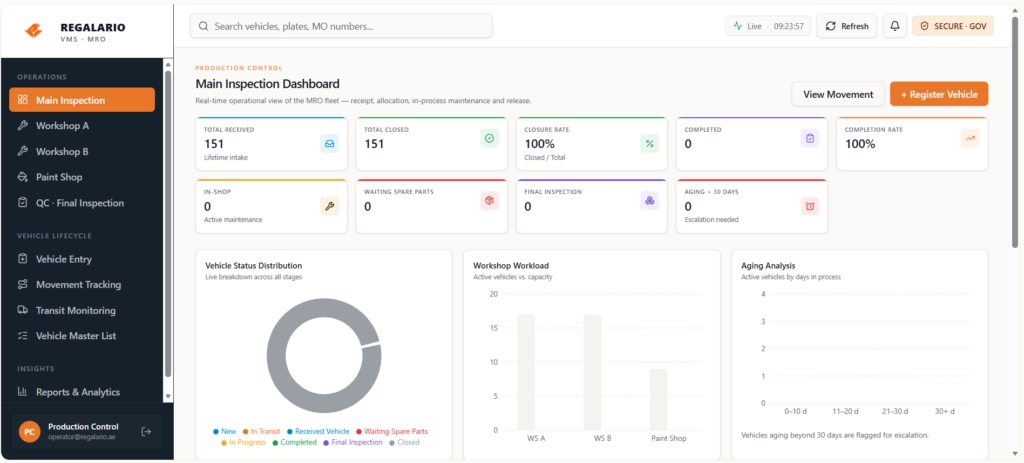
Project Objective
The main objective of this initiative is to transform vehicle monitoring from a manual process into a centralized and efficient monitoring system that provides better visibility of vehicle movement throughout operations.
The system is designed to monitor vehicle status from:
Key Features
Operational Impact
This initiative aims to support operational efficiency by:
Continuous Improvement Perspective
As an Industrial Engineering professional, I believe that many improvement opportunities come from observing daily operational challenges. Small inefficiencies in routine processes can often lead to meaningful system improvements that enhance productivity, visibility and workflow efficiency.
This project reflects my interest in combining process improvement, operational analysis and digital solutions to support smarter and more efficient operations.
Future Vision
I’m hoping to further present and demonstrate this initiative in the future, although there are currently some operational restrictions and limitations that may prevent full implementation at this stage. Nevertheless, continuous improvement begins with identifying real operational problems and developing practical solutions that create value for the organization.
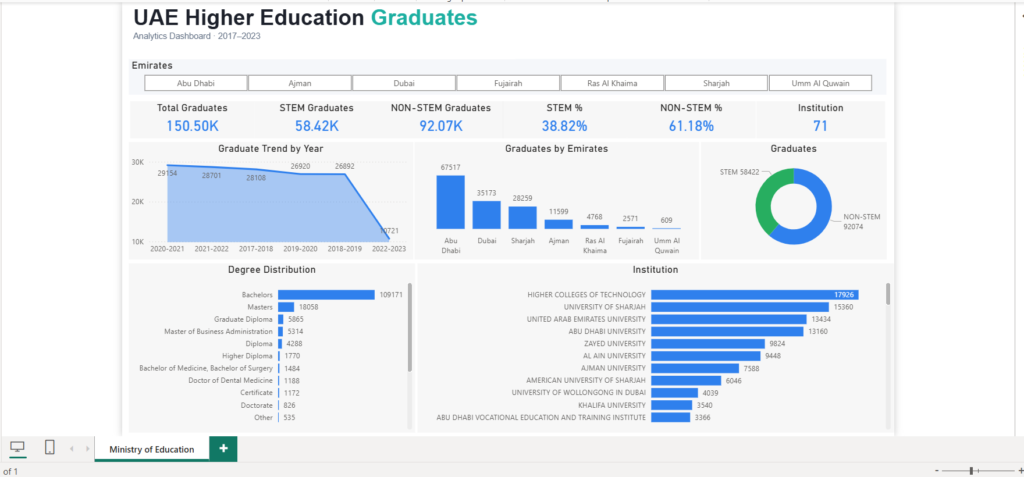
Project Overview:
As part of my data analytics portfolio, I designed a comprehensive Power BI dashboard to analyze and visualize trends in higher education graduates across the UAE from 2017 to 2023. The dashboard aggregates data by academic year, degree, institution, emirate, and STEM vs non-STEM classification, providing actionable insights for education policy, workforce planning, and institutional analysis.
Key Features:
Insights and Analysis:
Technical Skills Applied:
Impact:
This dashboard supports policy makers, academic institutions, and workforce planners in making informed decisions about education strategy, skills development, and regional talent distribution.
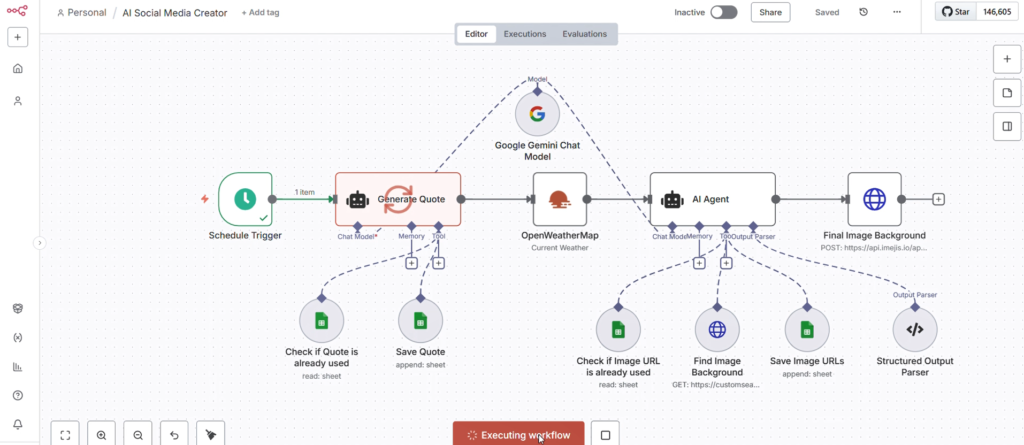
Project Overview:
This project showcases an end-to-end AI-powered automation workflow designed to generate and publish engaging social media content. Built using a low-code orchestration platform, the system integrates multiple AI models and APIs to automate quote generation, contextual enhancement and visual content creation—reducing manual effort and ensuring consistent, high-quality outputs.
The workflow consists of the following key components:
Structured Output Parsing
Key Features
 Fully automated content pipeline
 AI-driven quote and caption generation
 API integrations (weather, image services)
 Data validation using Google Sheets
 Dynamic image selection and management
 AI agent orchestration with memory and tools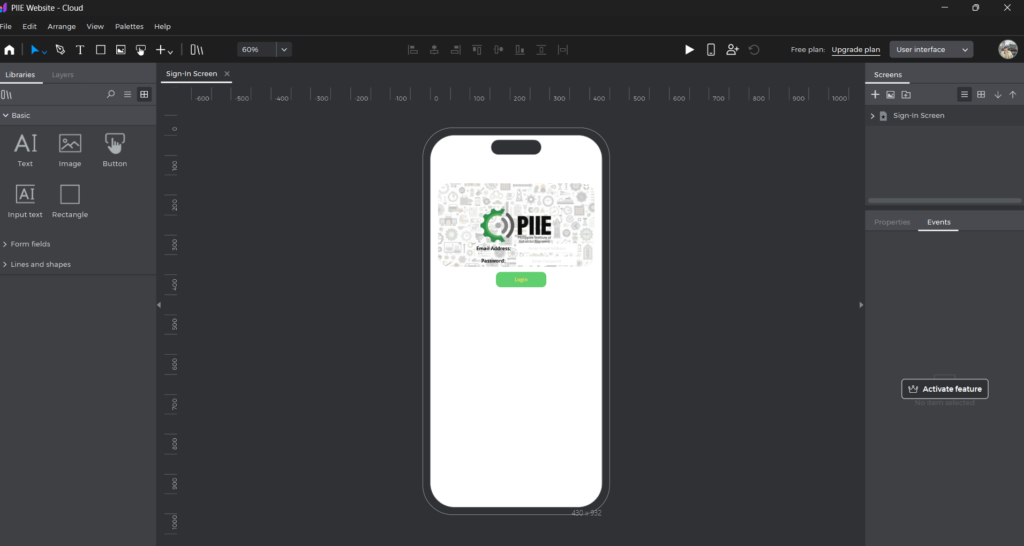
Project Overview
This project focuses on designing and prototyping a responsive mobile interface using Justinmind, aimed at delivering a clean, intuitive and user-centered digital experience. The interface appears to support a dashboard-style application, likely centered around user engagement, activity tracking and quick access to key features.
The goal was to create a seamless interaction flow that balances visual clarity with functional efficiency, ensuring users can easily navigate, access information and perform actions without friction.
Design Objectives
Key Features
1. Dashboard-Centric Experience
2. Quick Actions Panel
3. Event Management Section
4. Clean Visual Hierarchy
5. Mobile-First Design
6. Consistent UI Components
Design Highlights
Tools Used
Outcome
The final prototype demonstrates a user-friendly, scalable and visually cohesive interface, effectively showcasing how thoughtful UX design and interactive prototyping can enhance user engagement and streamline digital experiences.